Description
Reformat/Normalize markdown with some configurable settings
Additional Information
| Links: | |
|---|---|
| Maintainers: | bwat47 |
| Version: | 1.5.6 |
| Minimum app version: | 3.5 |
| Downloads: This version: | 20 |
| Last updated: | 2026-07-21T04:05:43Z |
[!NOTE] This plugin was created entirely with AI tools.
[!NOTE] This plugin only works in the Markdown editor.
Markdown Formatter
A Joplin plugin that formats the current note's Markdown with some configurable rules.
The plugin parses Markdown to find known structures, then applies targeted edits to the original text. Syntax it does not explicitly understand is left alone.
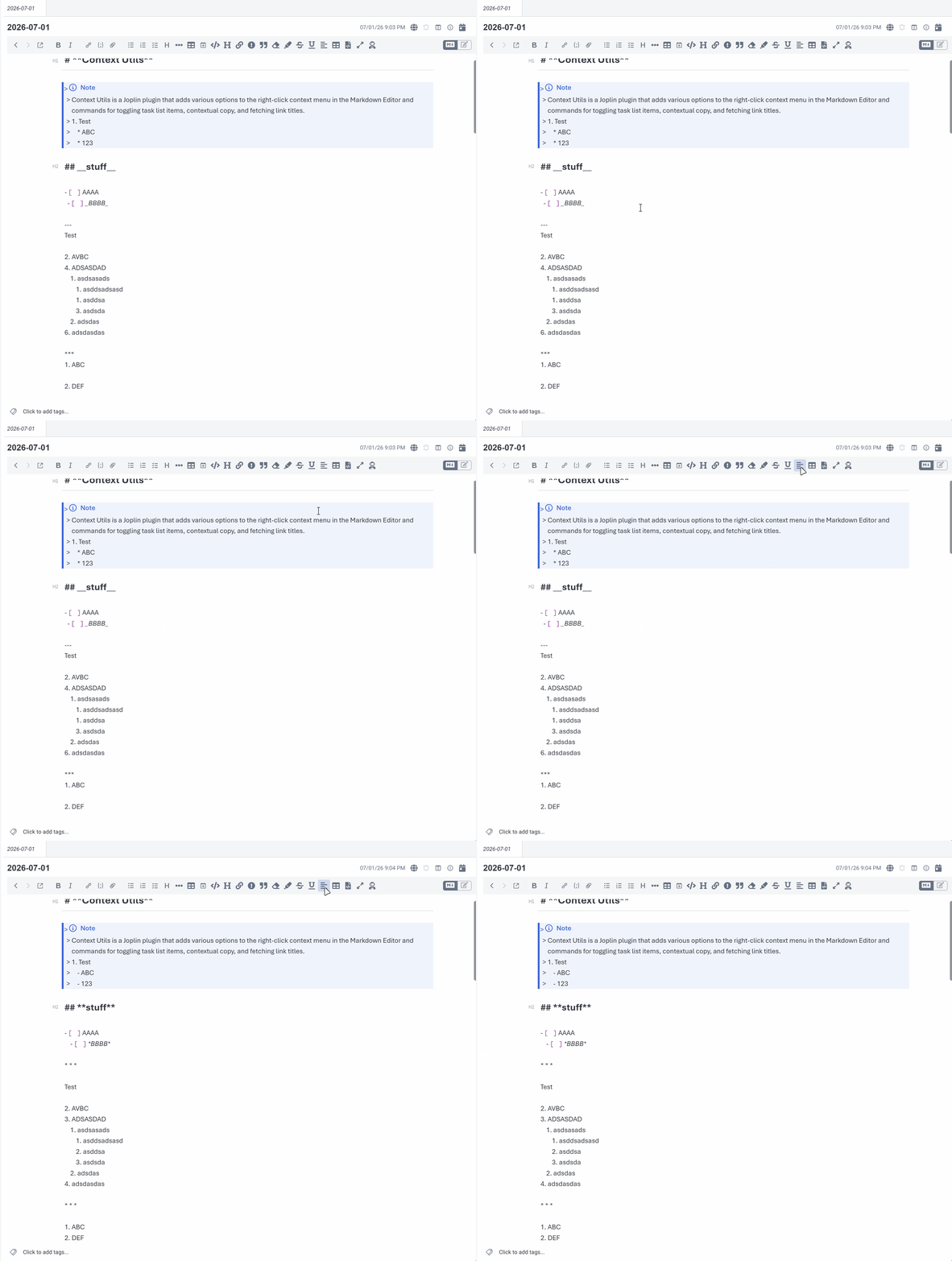
Features
- Formats the current note with configurable settings (see settings section below).
- When applying formatting, the old and new text are diffed and only the changed spans are replaced, all in a single codemirror transaction, so the cursor and scroll position can stay anchored to unchanged text, and the changes can be undone with a single undo command.
Usage
Install the plugin, open a Markdown note, then:
Edit -> Format MarkdownCtrl+Alt+Fon Windows/LinuxCmd+Alt+Fon macOS- Click
Format Markdownbutton in the formatting toolbar
The command formats the currently open note. If the note is already formatted, it does not write the note back.
Settings
Settings are available under Markdown Formatter in Joplin's plugin settings.
| Setting | Default | Description |
|---|---|---|
| Unordered list marker | - |
Rewrite unordered bullets to dash or asterisk, or preserve them as written. |
| Normalize ordered list numbering | On | Renumber ordered lists sequentially, keeping the first item number. |
| Normalize heading level increments | On | Lower skipped heading levels so headings increase one level at a time. |
| Normalize heading marker spacing | On | Use one space between ATX heading markers and text, including optional closing markers. |
| Remove heading indentation | On | Move root-level ATX headings to the start of the line without changing indented code or headings nested in containers. |
| Horizontal rule marker | * * * |
Preferred format for horizontal rules. |
| Emphasis (italic) marker | *emphasis* |
Prefer * or _ for emphasis delimiters. |
| Bold marker | **bold** |
Prefer ** or __ for strong delimiters. |
| Double quote style | Preserve | Convert double quotes in prose to straight or smart (curly) quotes. Code, math, HTML, front matter, and link titles are never changed. |
| Single quote style | Preserve | Convert single quotes and apostrophes in prose to straight or smart (curly) quotes. Same exclusions as double quotes. |
| Normalize link text spacing | On | Collapse internal whitespace and trim leading/trailing spaces inside link text, including reference links. Inline code inside link text and image alt text are left unchanged. |
| Set default language on unlabeled code blocks | Off | Add the configured default language to fenced code blocks with no language. Indented code blocks are left unchanged. |
| Default code block language | txt |
Language identifier to add when the default code block language rule is enabled. |
| List spacing | Semantic | Semantic keeps each list tight or loose as authored and only fixes mixed spacing, so rendering never changes. Preserve, tight, and loose are also available. |
| List indentation | Tabs | Indentation used before nested list markers (tabs, 2 spaces, 4 spaces). |
| Table style | Preserve | Compact rebuilds cells with one space of padding; aligned pads cells so pipes line up. Preserve leaves tables unchanged. |
| Ensure blank lines around headings | On | Add one blank line before and after headings with neighboring content. |
| Ensure blank lines around paragraphs | On | Add one blank line before and after root-level paragraphs with neighboring content. |
| Ensure blank lines around code blocks | On | Add one blank line before and after code blocks with neighboring content. |
| Ensure blank lines around math blocks | On | Add one blank line before and after math blocks with neighboring content. |
| Ensure blank lines around tables | On | Add one blank line before and after tables with neighboring content. |
| Ensure blank lines around blockquotes | On | Add one blank line before and after blockquotes with neighboring content. Quote interiors are never rewritten. |
| Ensure blank lines around lists | On | Add one blank line before and after root-level lists when neighboring content exists. |
| Ensure blank line after front matter | On | Add one blank line between YAML front matter and following content. |
| Collapse consecutive blank lines | On | Reduce runs of blank lines to one blank line outside protected content. |
| Trim trailing whitespace | On | Remove trailing spaces and tabs outside protected content, preserving two-space hard line breaks. |
| Ensure trailing newline | On | End the note with exactly one newline. |
| Display toast messages | On | Show a toast after formatting with the number of characters added and removed. |
Safety Model
The formatter follows a "parse for analysis, edit the original text" model. Each rule runs as a separate pass against a parsed tree that matches the current Markdown:
- Locate structures the rule understands.
- Apply small string edits to the current source text.
- Parse the edited result and verify that the document structure still matches.
- Reuse that verified parse for the next rule.
If a rule's edits would change the parsed document structure in an unexpected way, that rule is skipped and the note is left with the last safe output. If formatting fails, the plugin leaves the original note unchanged.
Protected content such as fenced code blocks, indented code blocks, inline code, YAML front matter, math, and HTML blocks is preserved by whitespace-oriented rules.
Known Limitations
- Lists inside blockquotes are not reindented and their tight/loose spacing is not changed. Their list markers and ordered numbering can still be normalized.
- Tables inside blockquotes are not reformatted.
- Lists inside footnote definitions are not reindented.
- Emphasis conversion to
_skips cases where CommonMark would reinterpret intraword underscores or merge adjacent delimiter runs. - Smart quote conversion decides opening vs. closing from surrounding characters, so unusual constructs can get the wrong direction. Backslash-escaped quotes and quotes in image alt text and link titles are left as written.
- Link text spacing normalizes only
textinside links; a hard line break (breaknode) inside link text and image alt text are left as written. - Might be slow to format massive notes.
Development
Install dependencies:
npm install
Run tests:
npm test
Lint TypeScript:
npm run lint
Build the plugin archive:
npm run dist
The distributable .jpl archive is created under publish/.
License
MIT